
How to get bingo cards delivered
Choose Home delivery from a template that offers it, or select the delivery option while printing a card you created. Checkout shows the destinations, card options, price, and estimated delivery time for your address.
Order a template
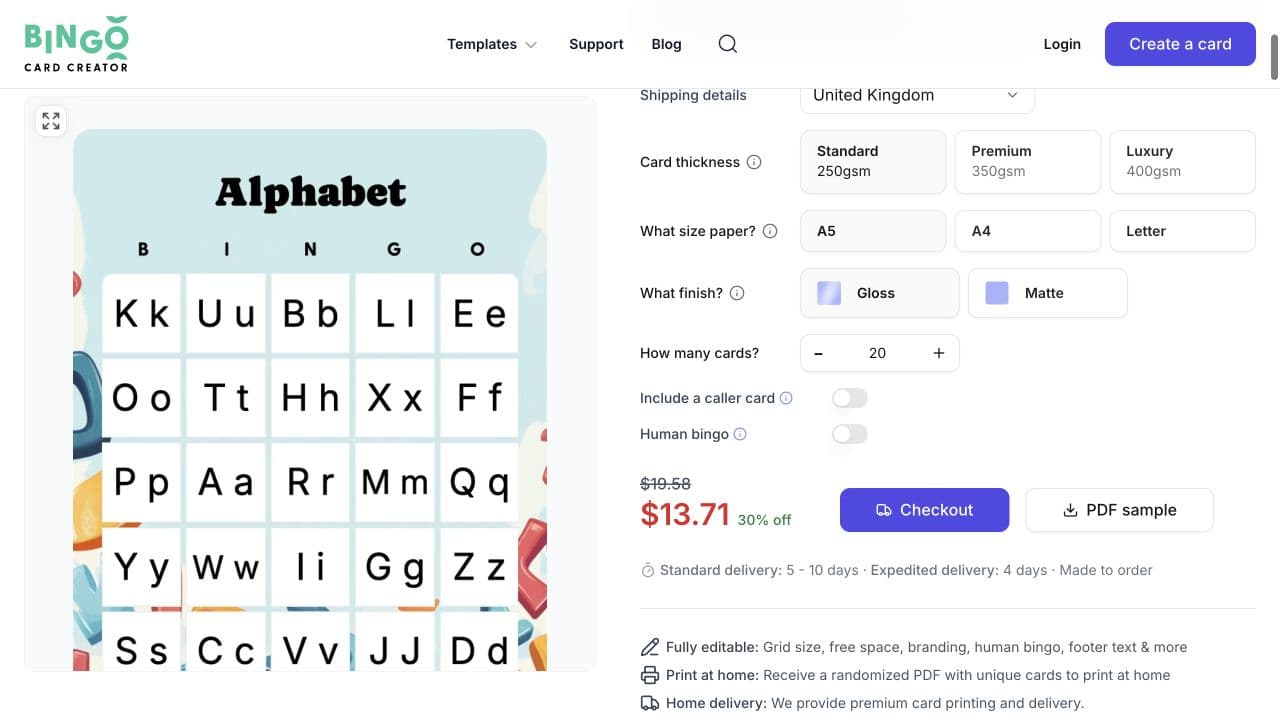
- Open a template and select Home delivery.
- Choose the destination shown in the order form.
- Select the available card stock, size, finish, and quantity.
- Review any optional extras, such as a caller card or Human bingo.
- Continue to checkout and enter the delivery address.
You can choose the delivery options and reach checkout while signed out. Checkout may ask you to sign in when you enter your contact details.
Delivery is offered to Australia, Canada, Ireland, Puerto Rico, the United Kingdom, and the United States. If your destination does not appear at checkout, delivery is not available for that order.
Order a card you created
- Open the card in the editor.
- Select Print cards.
- Choose Premium card delivery.
- Review your selections and the card preview before continuing to checkout.
For a card you created, checkout can offer Standard 100lbs, Premium 130lbs, or Luxury 150lbs card stock; A5, A4, or Letter sizes; and Gloss or Matte finish. The choices can vary by destination, so select from the options offered for your address.
Review the order before payment
Before placing the order, confirm:
- the destination and delivery address;
- card stock, size, finish, and quantity;
- card content, spelling, images, and optional extras;
- the calculated price, taxes, and shipping;
- the production and delivery estimates shown at checkout; and
- the payment method selected.
Delivery dates shown during checkout are estimates and are not guaranteed. Order far enough in advance to allow for production and delivery variation.
Orders cannot be amended or cancelled after they are placed. Review the sample, card content, and order summary carefully before completing payment. Delivery orders can contain 20 to 1,000 cards.
If delivery is unavailable
If a destination, shipping method, quantity, or payment method does not appear at checkout, it is not available for that order. Choose one of the offered options or contact support before paying. Options cannot be added after the order is placed.
If there is a problem with an order
The shipping confirmation includes a tracking link. Keep the order confirmation, tracking information, and photos that show the problem.
If the cards are lost or damaged during shipping, contact support. The current Terms say Bingo Card Creator will offer a replacement or refund for cards lost or damaged during shipping.
If the delivered cards have a production issue that was not shown in the approved sample, contact support with the order reference and a description of the problem. Support reviews these cases and can arrange a manual reorder when appropriate.
Related guides
Was this article helpful?
Related articles
Browse allStill have questions?
Haven't you found what you're looking for in our support area? Contact us by selecting the button below.
Contact us